Products
Camouflage hides your Desktop Icons
Buy Now at the Mac App Store
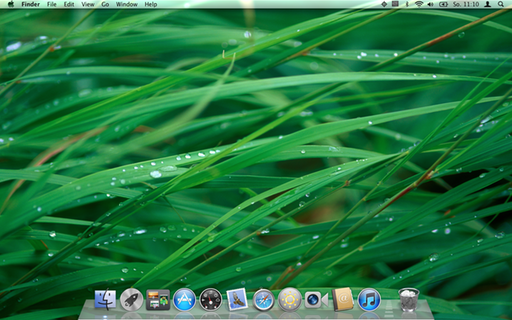
If you have a cluttered Desktop and just don't want to see your icons, or you just want to give a presentation and don't want your audience to see your desktop icons, Camouflage will help.
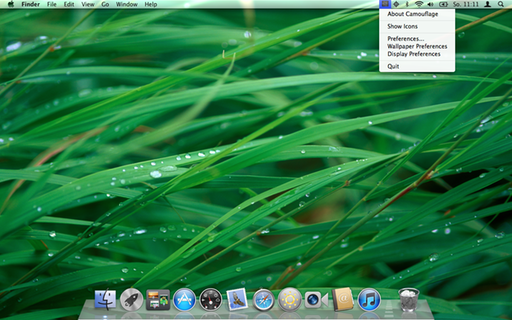
Sitting in the menu bar, Camouflage is easily accessible and can be quickly used to hide your desktop icons. For extra speedy access you can also configure a HotKey to show and hide your icons.
If there're just too many icons on your Desktop to have any overview over them, just hide them away with Camouflage and double-click your desktop to open a new Finder-Window for your Desktop-folder. Putting this window into list-view will allow for a much better overview over all desktop files instead of viewing them cluttered on the desktop.
Key Features ⇡
- perfect system-integration: change your wallpaper and Camouflage will show the change instantly.
- works with multiple monitors: attach new monitors and the icons will instantly be hidden.
- start dragging files to your desktop and wait a moment until a finder window pops up. There you can drop your file
- finder integration: double-click the desktop and Finder will be activated and opens or selects a separate desktop window. (press the option key while double-clicking will open the download folder)
- Support for Path Finder - when Path Finder is running, a Path Finder window will pop up on double-click
- ability to quickly show and hide the icons (available in status item menu or via HotKey)
- drag Camouflage to your Dock and hide the Menu icon! Click the dock icon to show/hide icons. Use the Dock's context menu to access Camouflage's Menu
- works with Spaces
Screenshots ⇡
FAQ ⇡
- What versions of OS X is Camouflage compatible with?
Camouflage fully supports OS X 10.10 - 10.12 - Why can I see the icons when I use Desktop-Exposé in OS X 10.7 and newer? The icons are hidden in 10.6!
The way Spaces works in 10.7 and above changed significantly compared to 10.6. To make Camouflage work in 10.7 properly this feature had to be removed. - Why do the icons appear when I switch Spaces?
Same as the previous answer. Spaces changed and that was the only way of getting Camouflage to behave. - Why do I see no response to my Reviews in the Mac App Store?
Currently Apple doesn't provide a way to respond or react to Reviews. If you want to communicate with other users, post a review. If you want to communicate with the developer, please send me a mail! - My Menubar is full, what can I do to access Camouflage?
First you can switch to an application like Finder, which has a shorter menu than Safari. Maybe Camouflage's Menu Item is not hidden then. You can also drag Camouflage from your Applications Folder into the Dock. Once ther, you can click on Camouflage in the dock to show and hide your icons. The Camouflage Preferences also allow you to turn off the menu item completely. - I disabled the menu item, how can I access Camouflage's preferences?
You can press the Shift-Key and launch Camouflage from your Applications folder. You can also drag Camouflage to the Dock and use the Context Menu of the Dock. Or you can use the Context Menu on Desktop, when the icons are hidden
Privacy ⇡
- Camouflage does not collect or share any data.
- Camouflage uses the Screen-Recording API to acquire the currently active desktop wallpaper in order to show this image right on top of the icons, thus effectively hiding the icons.