I’ve already written about why every developer should know his way around with otx so this is sort of like a follow up on this topic.
Today Peter Hosey asked on Stack Overflow about an interesting stack trace. Obviously the writeWithFormat() function didn’t crash recursively. So it appears that the crashlog is lying to us about the function that makes trouble. No need to panic, there’s plenty of useful information left in the crashlog to help us find the bug. First of all there are offsets:
0 com.growl.GrowlSafari 0x179d383c writeWithFormat + 25
1 com.growl.GrowlSafari 0x179d388e writeWithFormat + 107
2 com.growl.GrowlSafari 0x179d388e writeWithFormat + 107
...
So the first frame is at offset 0x179d383c and all the other frames are at offset 0x179d388e. The only way to make sense out of these numbers is to use otx to disassemble the binary and look at the offsets to find out what’s really being called (the current svn version of otx is much more current, if you don’t mind compiling the tool yourself).
Before we can start disassembling we first need to know which file to disassemble. Fortunately the crashlog contains that information at the very beginning.
Process: Safari [2062]
Path: /Applications/Safari.app/Contents/MacOS/Safari
Identifier: com.apple.Safari
Version: 5.0 (6533.16)
Build Info: WebBrowser-75331600~5
Code Type: X86 (Native)
Parent Process: launchd [84]
PlugIn Path: /Applications/GrowlSafari.app/Contents/Resources/GrowlSafari.bundle/Contents/MacOS/GrowlSafari
PlugIn Identifier: com.growl.GrowlSafari
PlugIn Version: 1.2.1 (1.2.1)
So i’m sure everyone agrees that Safari doesn’t need to be disassemble, even though the crashlog says so in the Path. The crashlog is kind enough to tell us which plugin causes the crash, so we can take the plugin’s path as input to otx and pipe it to TextWrangler‘s command line tool:
otx -arch i386 /Applications/GrowlSafari.app/Contents/Resources/GrowlSafari.bundle/Contents/MacOS/GrowlSafari | edit
Another indication to disassemble the plugin are the frames, as they all contain the identifier of their bundle: com.growl.GrowlSafari.
So now we have the disassembly of the plugin, but the offsets of the crashlog cannot be found. The offsets produced by otx start at 0x00000f54 and go to 0x000024f3. That’s not nearly close to 0x179d383c. The reason behind that is simple: the plugin’s code is mapped into the memory where the linker things it got some space left. So we need to find out where the plugin was mapped in order to find the right spot in the disassembly.
Again, the crashlog got all the information that is needed. At the end of the crashlog is a list of all the plugins, frameworks and bundles, that are loaded into the application at the time when the crashlog was taken.
It looks like:
Binary Images:
0x1000 - 0x526ffb com.apple.Safari 5.0 (6533.16) <5CC91F2A-7709-6B9E-069D-C6E408F1A14B> /Applications/Safari.app/Contents/MacOS/Safari
0x1340000 - 0x1340ffc +com.growl.GrowlSafariLoader 1.1.6 (1.1.6) <BF586D9F-39A9-BD06-1C83-6F1E527822CA> /Library/InputManagers/GrowlSafari/GrowlSafariLoader.bundle/Contents/MacOS/GrowlSafariLoader
0x13b3000 - 0x13b3ff7 com.apple.JavaPluginCocoa 13.2.0 (13.2.0) <6330F04D-3250-2071-42E4-0ABB54216529> /System/Library/Frameworks/JavaVM.framework/Versions/A/Resources/JavaPluginCocoa.bundle/Contents/MacOS/JavaPluginCocoa
So the first two numbers are the start and end offsets of the mapped binary. The application itself is typically mapped to the beginning, which always starts at 0x1000. The provided information also includes the bundle identifier, version numbers, a unique id and the path. I have actually no idea what the + before com.growl.GrowlSafariLoader stands for, so if anyone knows, please tell me :-).
Searching for our bundle identifer reveals this line:
0x179d2000 - 0x179d4ff7 +com.growl.GrowlSafari 1.2.1 (1.2.1) <10F1EF69-D655-CCEE-DF3A-1F6C0CF541D3> /Applications/GrowlSafari.app/Contents/Resources/GrowlSafari.bundle/Contents/MacOS/GrowlSafari
It appears that 0x179d2000 is our base offset. Subtracting that from our offsets gives us the offsets 0x183c and 0x188e. Subtracting is pretty easy in our case, but in general subtracting hex numbers is done easiest in gdb:
p/x 0x179d383c - 0x179d2000
Now that we have our correct offsets, we can have a look at the disassembly of that offset to see what’s going on.
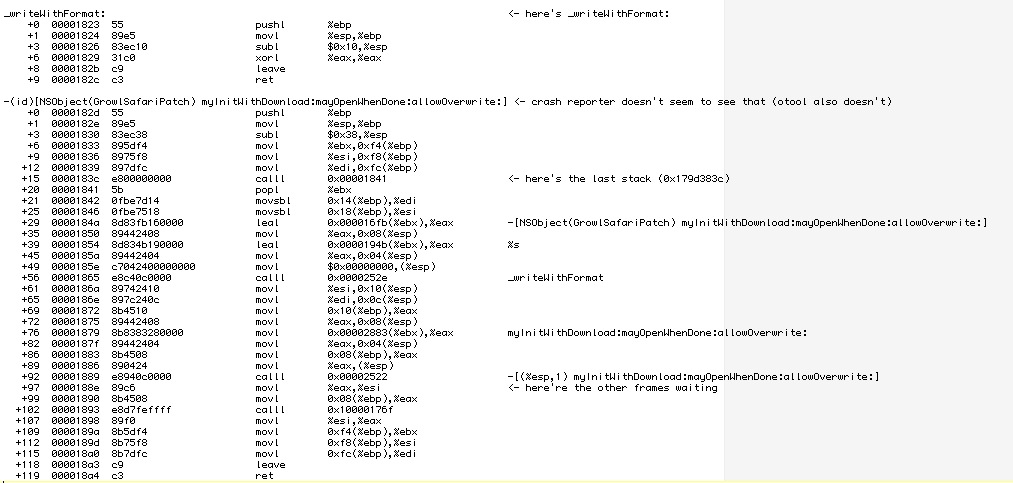
i’ve already added some comments at the two offsets that are shown in the stack trace. First thing that one sees is that the disassembly has proper method names and the offsets both are inside the myInitWithDownload:mayOpenWhenDone:allowOverwrite: method. At offset 0x188e (the offset that all the frames show) there’s a movl instruction, but this is not the instruction we are looking for. The instruction right before the movl is a calll instruction. As the name suggest, it calls a function but on return it continues at offset 0x188e, which is why we see this offset in the stack trace. Otx is kind enough to annotate the calll instruction with Objective-C-like comments that show which function is called. It appears that the function calls itself, thus causing a recursion and the crash. Usually one wouldn’t program a function to call itself, but in that case the method is part of a MethodSwizzle, where this is normal behavior (MethodSwizzling can be done easily with Wolf Rentzsch‘s JRSwizzle project).
So why is the method swizzling not working in our case? The answer is again shown in the crashlog: there are actually two versions of the plugin loaded into Safari at the same time.
0x140c000 - 0x140efff +com.growl.GrowlSafari 1.1.6 (1.1.6) <1E774BDF-5CC5-4876-7C66-380EBFEAF190> /Library/InputManagers/GrowlSafari/GrowlSafariLoader.bundle/Contents/PlugIns/GrowlSafari.bundle/Contents/MacOS/GrowlSafari
0x179d2000 - 0x179d4ff7 +com.growl.GrowlSafari 1.2.1 (1.2.1) <10F1EF69-D655-CCEE-DF3A-1F6C0CF541D3> /Applications/GrowlSafari.app/Contents/Resources/GrowlSafari.bundle/Contents/MacOS/GrowlSafari
I think the reason for the crash is that both plugins define the same method and when the second plugin swizzles its methods, the original implementation of Safari is probably swizzled out and only the two patched methods are left. I think the older patch is called first, resulting in a call to the new patch, which then recursively calls itself. Maybe before swizzling two methods one should check if there was a swizzle before and reverse it before applying a second swizzle.
But those mind swizzling details are probably not too important for the actual fix for this crash and also don’t have much to do with our little excursus to crashlogs-wonderland. I hope you enjoyed the trip 😀
@_karsten_
